
Reviewing the AIM Data Logger fitted to Lotus Elise
Introduction
Ever since I started seriously driving in trackdays which led to competing in sprints and then hill climbs, I have yearned for ways to evaluate my performance; one way is to time the laps that you do. But the rules at trackdays are quite clear; timing is not allowed by you in your car or by anyone for you in the pit lane or anywhere else on the track. Offenders are promised exclusion and a fate worse than death… and so stopwatches and car installed timing equipment are apparently a nono. Competitors in speed, race and other competitive events, of course, are allowed to time their hearts out.
Track Day Timing
Timing, in track day reality is a little bit of a grey area. Some production cars have timing apparatus as an option and it is possible to install aftermarket timing options and then there is the video option. The hard and fast rule is not so much the timing of laps but the viewing and analysis of such data during the meeting. So long as you aren’t spotted with a stopwatch or other obvious timing equipment, or analysing data on a laptop or suchlike, then organisers turn a blind eye to your having a car installed system that captures data for later analysis and there is no issue with the video camera so long as it is safely installed. Moreover, some circuit owners will ask you to sign a declaration stating that any video footage captured is not used for commercial purposes…
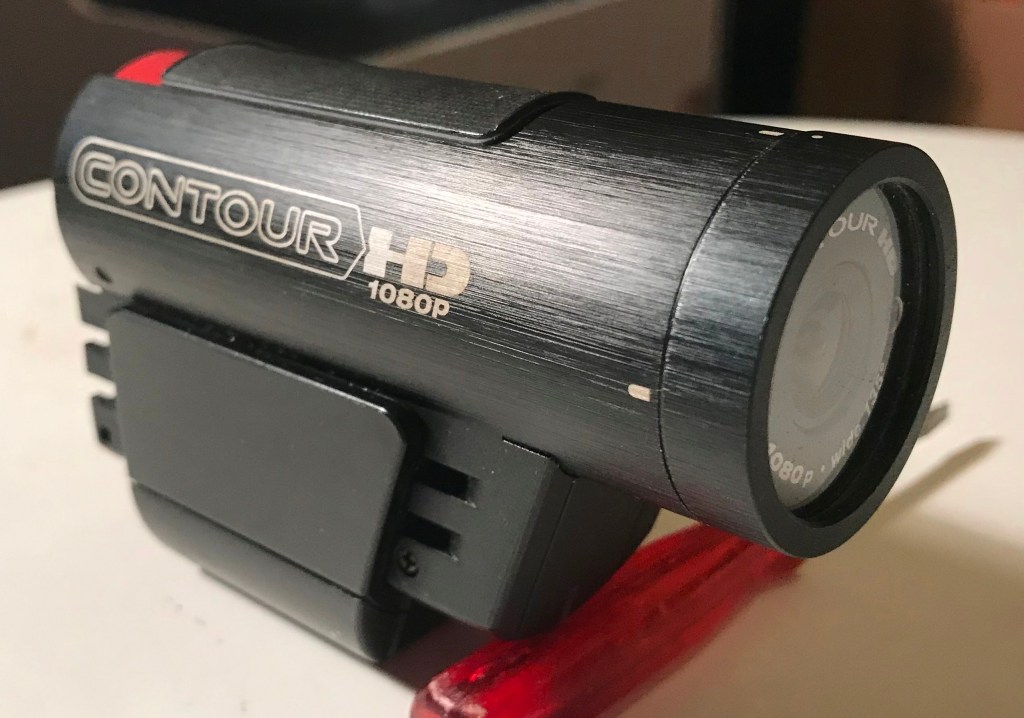
Early on I purchased a Contour video camera and used this to video my track day laps. At the end of the day I would pack up and go home and then run the video and ‘time’ each lap with a stopwatch or the second hand on my watch. I even discovered software that analysed the video and produced a timing report for each lap. Simple… The main issue with video cameras at all events is installation location. I am more concerned with ‘tintops’ and anyway, open cars probably allow easier installations in that there are more ‘tubes and bars’ on which the camera may be clamped. The most obvious method and location in a saloon car is a suction cup attached to the windscreen; but this location may only be legally used in both track day and motorsport events if a secondary method of attachment is also used due to the real possibility of the suction cup losing grip and falling off. I know… A roll bar location is preferable, where available, or a headrest mount is available to purchase for cars without roll bars.
TomTom Bandit 
Carista EOBD Connector 
Once you start using video for timing then it is a small step to contemplate other devices and other data. On the majority of modern cars the ECU can provide data such as speed, RPM, throttle position, gear selected, brake usage and other data which can be overlaid over the video so that you may explore exactly where you are gaining – or more likely – losing time. A smartphone can be used for both video and as a medium for data. Track Addict and Harry’s Laptimer are two of the best known software providers for use on your smartphone and with GPS, this can be linked to the car EOBD port with a suitable Bluetooth connector. They are however, awkward to set-up and need to view the sky for a good GPS connection – which probably means a windscreen mount that may not be allowed in track day or even competitive events without a secondary restraint. In 2019 I replaced my trusty Contour video camera with a TomTom Bandit video camera which I meant to connect with my iPhone, a Carista Bluetooth EOBD connector and Track Addict but never really got over installation issues.
Me and Track days
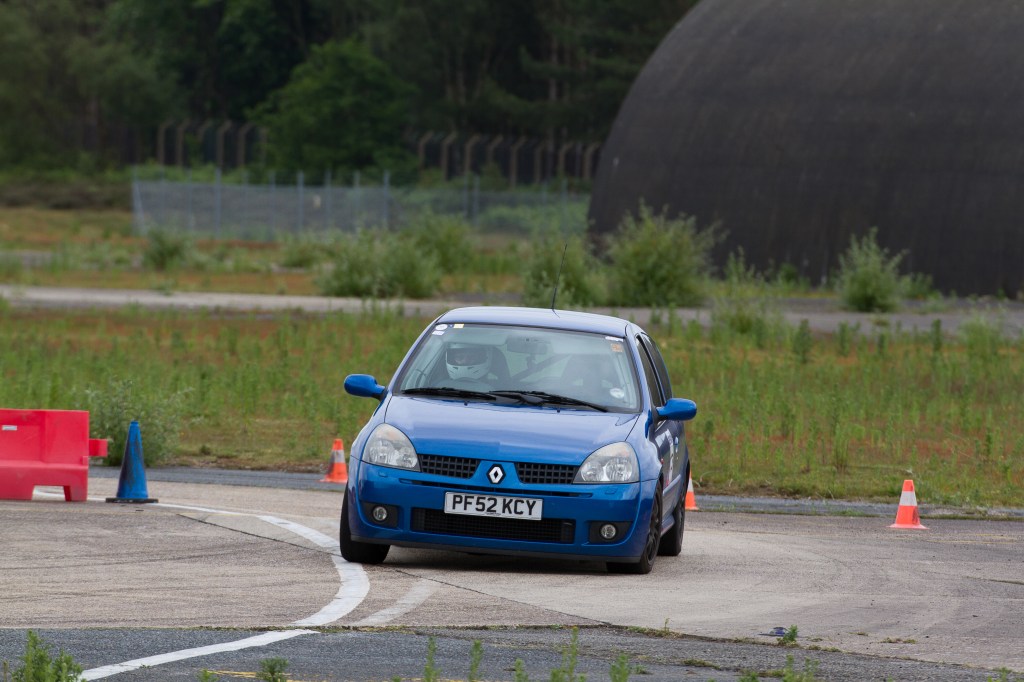
Renault Clio Cup 
Lotus Elise
I started seriously driving track days in 2009 with a Renault Clio 172 Cup and having driven at most of the circuits in UK, I was intrigued by the Javelin Sprint series which did not require an MSA licence nor expensive race clothing; I signed up and competed in the series for four seasons at tracks mainly located in the midlands. At the end of 2015 the Clio went and was replaced with my current steed – a 2008 Series 2 Lotus Elise. Then, late in 2017 I was invited to compete in an MSA sprint at Snetterton. This required a medical examination [for me], an MSA licence and extra expense in an approved race suit etc. The event went off quite well and the next season I decided to enter the MSA HSA championship which also included hill climbs and in which many of the events were located in the South meaning less travelling. For the moment I shall probably stick to MSUK [new name for MSA] events. For 2020 I had entered six different hill climb and sprint championships. Then Covid-19 arrived… anyway, enough of this diversion and back to the subject under review.
Data Loggers
So let us now discuss the more sophisticated systems. These are often generic but may be adapted for specific vehicles and manufacturers such as AIM and VBOX are at the forefront of the technology here. A Data Logger – with or without video camera will collect the data mentioned above from either the EOBD connector or the vehicle’s CAN Bus and also time each lap of the circuit that you do. The systems will contain a database of tracks and using a GPS aerial will track your path as you perambulate around the circuit. The system will also know where the start/finish line is located and time each lap from that point. The data can be downloaded to a laptop or PC and additional software will allow a sophisticated analysis of your performance. I did have a brief foray with a data logger and bullet camera system by another manufacturer that I picked up at the 2015 Racing Car Show. It worked reasonably well with the Renault and my BMW m135i but not with the Lotus which has a carbon fibre body and wouldn’t accommodate the roof aerial at all.
AIM Data Loggers
AIM are a longstanding global company that manufacture both generic and vehicle designated data logging systems. I first saw the AIM advert in FB in early 2020 in which it was stated that a data logger system, designated MX2E, had been developed for Lotus Elise/Exige series 3, 2011-1019. The data logger system was a direct replacement for the Lotus instrument cluster. Disappointingly, it didn’t cover my series 2 car. An email to AIM confirmed that earlier models would be covered in a future update.
Several months later I learnt that the earlier Lotus S2 models were now covered and that a complete kit including the SmartyCam video camera was included. So I had a good sniff around the https://www.aimshop.com website. The system looked good and although installation instructions for the main unit were published there was no guide for installing the SmartyCam. I emailed a number of questions to AIM and received a quick reply which helped but was still vague over video system installation.
I went ahead and placed the order by telephone and was asked for a speedometer reading so that the unit could be supplied with an odometer reading for continuity sake – a nice touch. The package was delivered by UPS just one day later. On the very day that the package arrived I saw a press release advising that Lotus had approved the kit and that it is now available through Lotus dealers.
AIM MX2E & SmartyCam Installation on a Lotus Elise Series 2
In the box were the MX2E data logger instrument cluster unit complete with mounting screws & washers, a binnacle c/w cables, a GPS unit complete with aerial, a Data Hub and connecting cables, a SmartyCam video camera and a SmartyCam to Data Hub cable and roll bar mounting kit with jubilee clips and a DVD labelled Race Studio 3 software. A reverse camera is also available, but I decided to forgo this option.
My Lotus has a hard roof that although removable, is permanently in position. I thought of removing it to allow easier access during installation but decided not. As it happened, roof off would probably have made life slightly easier but I managed…
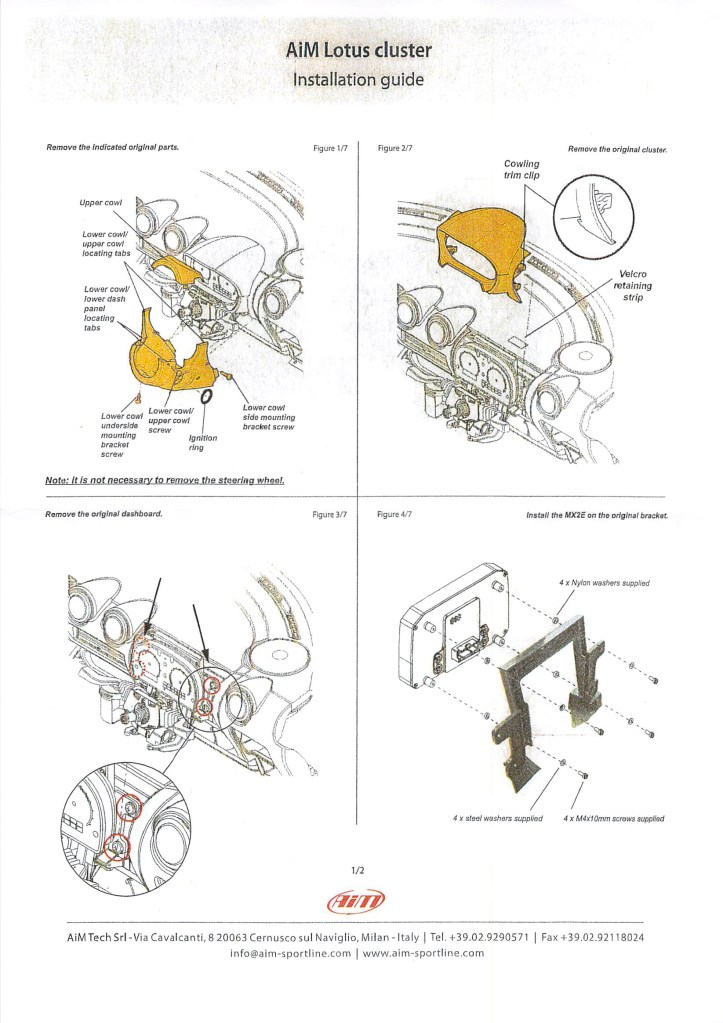
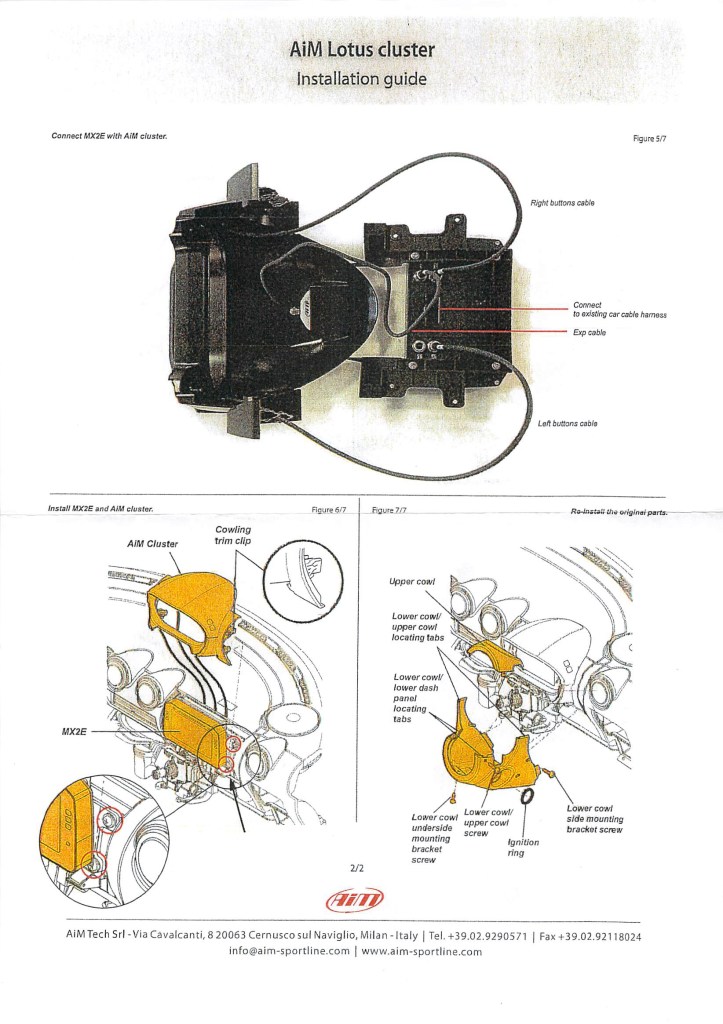
The installation instructions are mainly diagrammatic and not exactly full of detail! Other than the Race Studio 3 software the DVD had nothing of the various user manuals that you might need and expect and a card within the kit suggests download the user guide from https://www.aim-sportline.com/en/documentation.htm. I also received an email from Aimshop suggesting user manuals could be downloaded from https://www.aimtechnologies.com/aim-product-manuals/ and software from https://www.aimtechnologies.com/aim-software/. The links are general and you then have to identify your own products and search for the relevant user guides and software to download them. Very DIY… So I downloaded the user manual for MX2E [which also includes a brief guide to Race Studio 3], SmartyCam rev 2.1 and Track Manager and printed out a hard copy of each. Since MX2E and the RS3 software connect to each other over a local network and there is no DVD drive on my Laptop, I installed the Race Studio 3 software onto my laptop [no mention by AIM that the PC or laptop must be Windows 64 bit] from the web link; I didn’t download or install RS2, which I later discovered to be the analysis software, because there is no reference to it in the documentation – this was to create issues later on… I ran RS3 and it updated to the latest version.
The installation diagram is all the instruction supplied and is just about adequate. It would be nice if a list of tools required was provided, as I had to scrabble around in my various toolboxes to find a 7mm socket and 3mm Allen key when I found that they were required – the only other tools needed are flat and Philips head screwdrivers and a 7/16” AF o/e spanner for the SmartyCam nut. By now I realised that AIM’s approach is minimalist and this has proved true in all regards…
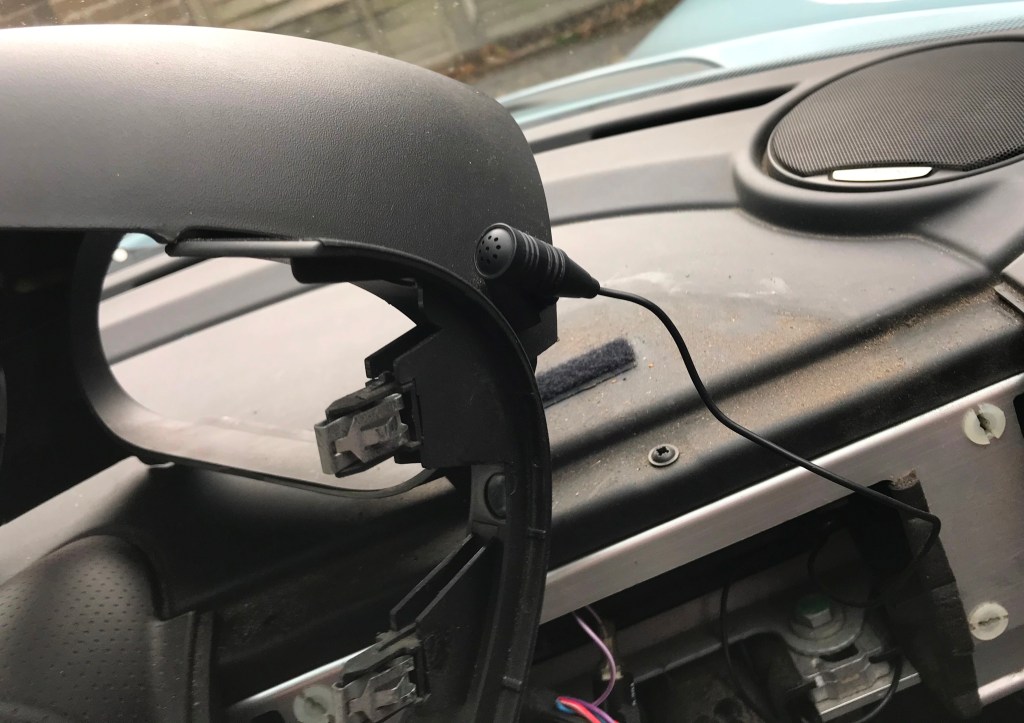
Removal of the old dash and installation of MX2E was fairly straightforward although I encountered several hitches along the way. On the Lotus S2 the lower cowl has a connection wire to the trip reset button and this should be disconnected at the in-line plug so that the cowl may be temporarily removed. Leaving it in position will hamper progress. Unfortunately the top cowling/binnacle on my S2 could not be removed due to what appeared to be a mini-microphone permanently attached to it by a bracket and a wire disappearing into the wiring loom behind the dash. A call to AIM technical support followed by a picture of the offending object confirmed that they also thought it was a microphone – but without any suggestion on how to proceed… Since the Lotus was originally owned by Lotus management for the first 6 months of its life, the microphone may have been part of some management device installed at the car’s birth. Guessing that it played no vital role in the vehicle’s operation, I lopped off the wire and taped up the part that went into the loom. The next issue concerned the 24-pin plug inserted into the dash rear and stubbornly refusing to budge. Brute judicious force released this item eventually. The remainder of the old dash removal went smoothly as mainly did the installation of the new AIM MX2E.
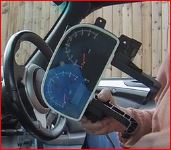
There is no advice or instructions for installation of the SmartyCam or its associated Data Hub and cables in the Lotus – other than a schematic showing how the cables are wired and this set-up is different to the set-up without the SmartyCam [see what I mean about a minimalist approach]. The best location for the Data Hub appears to be under the rear of the binnacle lying in a packed but ‘loose’ condition, but what with the length and thickness of the cables it gets pretty crowded in there. Obviously, connecting everything with just the MX2E sans SmartyCam is much easier…
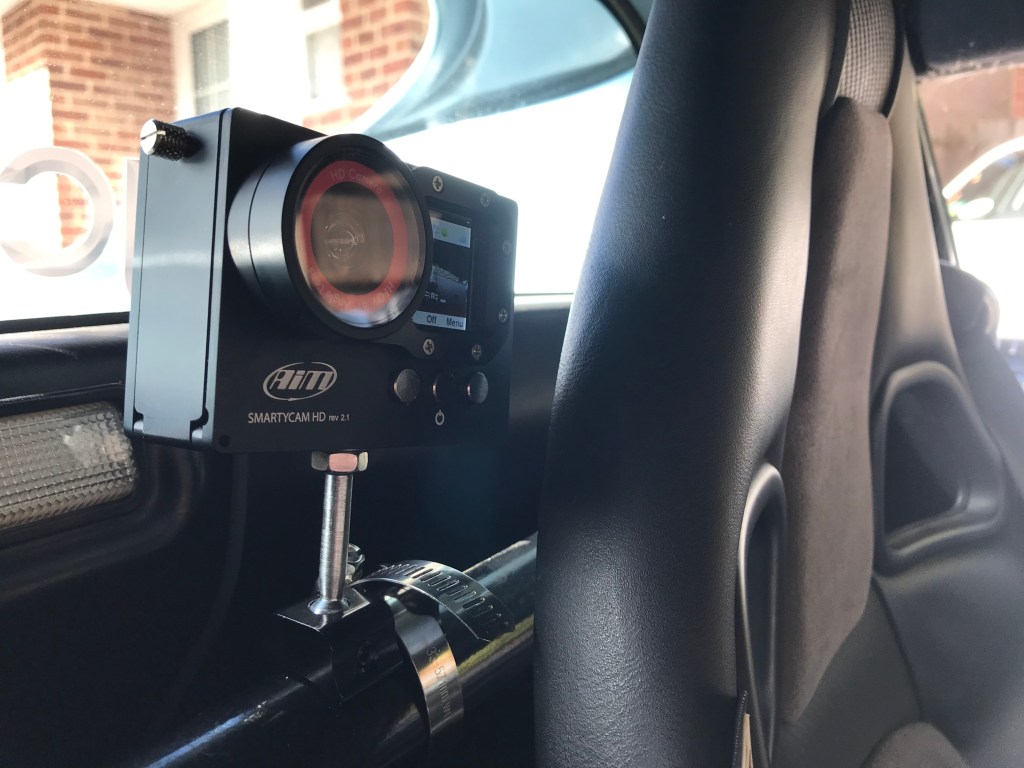
So I then routed the cable from MX2E through the car alongside the central tunnel to the roll bar between and behind the seats which is a little untidy… A mounting bracket and jubilee clip are provided on which the SmartyCam is screwed – oddly enough the securing nut requires a 7/16” o/e AF spanner rather than a millimetre size … The cable connection to the rear of the SmartyCam is very tight and just about allows the camera to be mounted vertically as it touches the bulkhead – a 90° elbow would be desirable here. It is useful to note that the SmartyCam screw tapping for the mounting bracket is standard camera thread so that any standard camera bracket could be utilised if desired.
After I positioned the new binnacle and refitted the old cowlings and tightened it all down I discovered that a cable was trapped and protruding over the front display and so I had to remove all the mounting screws, loosen the binnacle and release the cable before putting it all back together again…
Dash Console

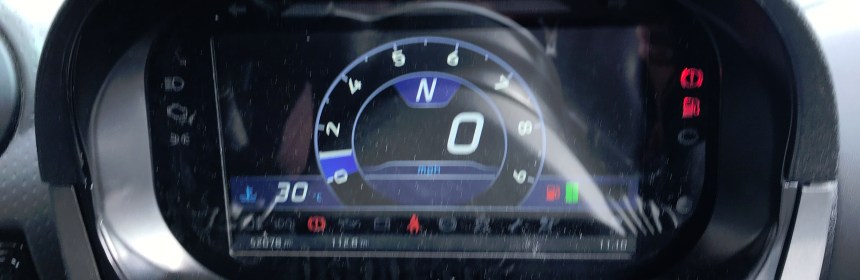
With the physical installation of the MX2E and SmartyCam complete; it was time for testing. I turned on the ignition and checked that all warning lights were present and functioning correctly. Now was the time to admire the new display and using the new dash mounted buttons to explore the combinations of ‘Road’ and ‘Track’ display in three base colours and two basic displays. They are all quite pleasing. However, on starting the engine there was no RPM and moving the vehicle provided no speed indication.
The new dash has four push buttons which are used to step through the menu system in order to set and change options within the system. It is quite intuitive and the purpose of each button is denoted within the display. With a flash of inspiration I used the buttons to check the Vehicle Model and found that the system had allocated the model as being 2011-2019. So much for ‘Plug and Play…’ After selecting ‘2008-2010’, RPM and speed magically appeared.
The user guide for MX2E is quite useful at a basic level, although it was obviously translated from another language by someone whose first language is not English and has a quaint turn-of-phrase at times; it mainly tells you most of the things that you need to know with some notable exceptions that I will discuss as we go along… it also has some anomalies that might be due to a change of specification or maybe the translation didn’t quite work…
There are a number of parameters that may be changed via the dash console; although the standard settings are probably good to go for most measurements. The dash display shows the gear selected which is a really useful feature; but I noticed that 1st gear is not displayed until the car has gathered momentum and reverse gear not at all. Running through the ‘Calc Gears’ routine on the console didn’t improve matters and asking AIM Tech support elicited no answer at all.
A user on the AIM FB site provided the answer that the gear display is calculated by speed x RPM. So 1st Gear [when first engaged] and Reverse will never be displayed. It’s a pity that the user manual doesn’t provide this info as I spent some time fiddling with the ‘Calc Gears’ routine trying to make it display correctly until I found out how it actually worked.
Time display
The time displayed on the Dash is based on UTC and annoyingly it wouldn’t display the correct BST which was in force at the time. After a lot of email toing and froing with AIM tech Support and some trial and error I established that you should enter the correct UTC time and the system will add an hour if it is BST. Again, no hint of this in the user manual…
RS3 Software
The AIM console and the RS3 software need to work together and firing up RS3 and connecting my laptop to the Lotus via a local network was quite straightforward. The laptop will need to be in proximity to the car which should have its ignition switched ‘on’. Configure the MX2E as a ‘New’ configuration and if your set-up includes SmartyCam then configure SmartyCam as a ‘New’ configuration too. When done, ‘Transmit’ the configurations to MX2E on the Lotus.
I didn’t check the ‘Shift Lights’ configuration before running the configuration routine which is done through RS3 software. I suspect that it was set ok at the outset, but the user manual is rather confusing here and I didn’t immediately twig that the configuration routine should only be run if you want to change the Shift Light operation or change the RPM limits. The best choice is to remain on the standard configuration, unless your engine has been modified; there are many options and you may change the RPM level at which any of the 10 lights turn on.
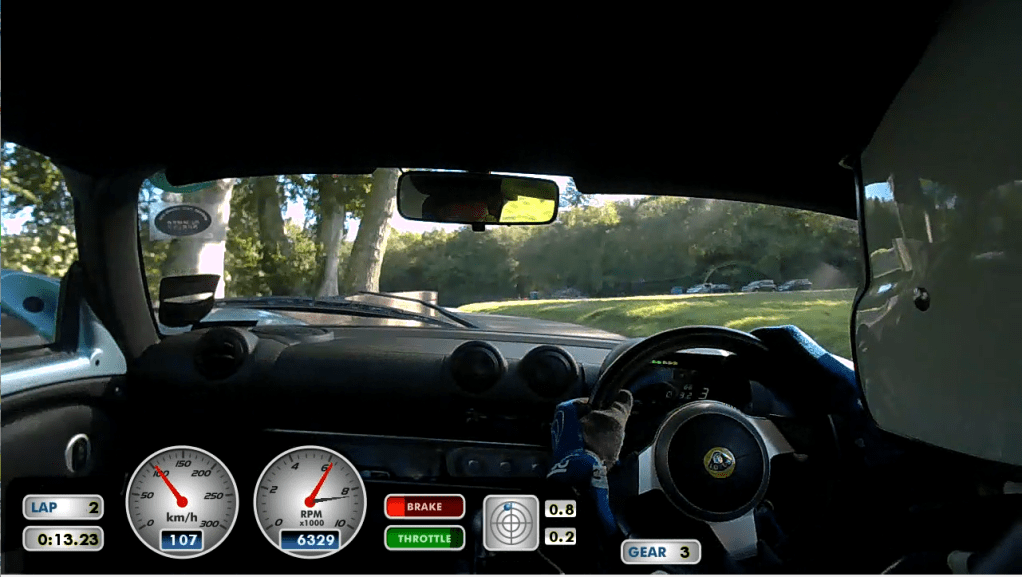
It is possible to change the standard SmartyCam video display by using the RS3 software. There is a standard display set-up which may be suitable for most and includes Speed, RPM, Throttle, G-Force, Brake [no data for Brake provided by the Lotus S2 ECU], number of laps and lap time. The display is very configurable and you may add additional icons such as ‘Gear’ – as did I – or even use a different display console. The user manual is misleading on how to accomplish this [you can’t use WI-Fi] and you will need to connect SmartyCam to your laptop using the USB cable provided. Switch on SmartyCam and an additional button ‘Transmit’ should appear in the SmartyCam display. Click on ‘Transmit’ and the new configuration should be displayed on the SmartyCam ready for use with the next recording.
Additional Sensors
It is also possible to add all sorts of additional sensors [including brake] via a Channel Expansion Hub and configure them for use with both the Dash Logger and SmartyCam. In this case the wiring and installation becomes much more complex with cables running from sensors on the brake pedal or from the rear mounted engine, through the car via the Channel Expansion Hub to the MX2E in the dash.
SmartyCam

I was fascinated by an icon on the main SmartyCam display. This icon is next to the icon showing battery charge and is ignored in the user manual; I finally worked out that it displays the amount of free space on the SD drive – jolly useful, but another example of an item ignored by the manual… SmartyCam can be configured directly through its own menu system in a number of different ways and can work independently or with the MX2E logger; I configured it to act as slave to the dash logger command which means that recording will start when the logger gives the command. Other SmartyCam configurations set by me included: Stop recording after 20 seconds of idle time and Automatic power off after 5 minutes of standby.
You can also configure SmartyCam to operate independently, but in this case it will function as a normal video camera with no display of Lotus data. Automatic operation of the camera is possible in independent mode by configuring the camera to start and stop recording according to various speed and acceleration parameters with reference to the internal 3-axis accelerometer.
General MX2E Issues unresolved by AIM Technology
Operating my Lotus with MX2E on both road and track threw up a number of issues. Some were resolved but the following list of serious issues remains stubbornly present:
SmartyCam Switch-off Issue
The so-called automatic power-off just does not work on my Lotus. SmartyCam switches on as soon as the ignition is turned on but only records when in ‘Track’ mode and once the car begins to roll. Once the ignition is turned off SmartyCam should turn-off after 5 minutes according to my setting. I was caught out the first time I put my Lotus to ‘bed’ for the night and in the morning the battery was almost flat and SmartyCam was shining bright and awake. So on every occasion that I turn-off the ignition I have to remember to manually turn-off SmartyCam – or should I call it DumbyCam. AIM Technical Support has no answer for this issue… it was suggested that I return the SmartyCam unit and connection cable for checking; I am loath to do that since AIM Technology make a charge for items returned under warranty when ‘no fault is found’ and I suspect that the issue is a system or software fault. I noted that power remains applied to SmartyCam after ignition is switched off and I believe that may be part of the reason but AIM Technical Support rejected that hypothesis.
Switching from Road to Track mode
The MX2E User Guide states: Top Left: “Menu/>>”; this button is also used to switch from street to track mode but only while running.
I asked AIM Technical Support this question: “When the car is ‘running’ on the road in any of the forward gears the button has no effect and certainly does not switch from Street to Track mode.”
AIM Technical Support replied: “An amendment has been made to the Lotus operation that had not been reflected in the manual, I will look to get that changed. There is a traction control button that when you turn traction control off it turns Race Mode on. The function had been removed from the binnacle buttons and now is operated by the traction control function.”
My answer: “The button that you refer to does not switch the 2008 Elise into Race Mode. It is a button used purely to deactivate the Traction Control. Pressing it has no effect on the MX2E status.”
Summary: On my 2008 model it is not possible to switch quickly from Road to Track use and requires seven presses of the buttons [upper left button once, upper right button thrice, lower right button thrice]. Going through this routine as you approach the Start Line is the last thing that you want to do prior to a race run…
This issue, therefore, also lies unresolved.
Shift Lights
A more serious issue with the AIM MX2E on the Lotus concerns the Shift Lights. The Shift Lights are mounted far too high on the MX2E dash and cannot be seen from my normal driving position and I find it impossible to see the Shift Lights on approaching maximum RPM in each gear without squatting in the seat – I am 5’7” tall; there is a video review of the AIM MX2E on YouTube by a reviewer who is 6 foot tall and he makes the comment. ‘You can’t see the Shift Lights and Indicators because they are mounted too high in the AIM dash’. The Lotus driver’s seat has only fore and aft adjustment and moving the seat rearward does give a better view of the lights; however, in that event my own feet are too far from the pedals and so there is no way I can adjust for that. Some longer limbed drivers may be able to find an acceptable balance; but anyone contemplating this system would be well advised to check it out on a Lotus in which it is already installed. I understand that Lotus specified the positioning of the lights – but whoever was responsible is unimportant as this will surely be an ongoing issue with many of the drivers who attempt to use the system in competition or at a track day. I was offered an additional Shift Light Module that mounts above the dash – but spending another £162 to compensate for what I see as a serious design fault is not something that I wish to do.
Traffic Indicator Lights
These also are mounted too high in the console and cannot be seen during normal driving. I understand that this is an issue to be addressed by resiting them at each end of the lower row of dashboard icons and that a software update will make them available in this position. I welcome this news and look forward to the day when it appears.
Speed Indication
It is possible to set the speed indication to ‘GPS’ or ‘ECU’. The GPS selection is actually more accurate than ECU – however, if the MX2E loses sight of the satellite when in GPS mode, then the speed function will not be displayed upon the dash. This happened to me on several occasions whilst driving on the road. This is not necessarily an MX2E fault but is probably a function of using a satellite to provide the speed indication.
MX2E User Guide
It is obvious that the manual has been translated into English from another language and some of the paragraphs are confusing or ambiguous when read by a native English speaking person. Some amendments to MX2E have yet to be incorporated into the guide.
RS2 and RS3 Software
There is no reference or guide to analysis of the data gathered from MX2E into the Race Studio software. There are a number of videos and Webinars available on You-Tube that are very instructional. However, AIM does not point you in their direction and you are left to stumble across them by dint of personal research. The videos mainly deal with the software generally and in some cases are slightly out of date as software has been upgraded. A new RS3 Beta system is subject to much discussion on You-Tube via AIM Webinars; within the limitations of the data gathered by my MX2E system, I found it more useful than the current RS3 software.
Using MX2E and SmartyCam at Speed [Sprint & Hill Climb) Events
Primary use of MX2E
When I bought the MX2E system for my Lotus it was with the express intention of using it to measure my performance and that of the Lotus in speed competitions. I did not mention this to AIM Technology at the time of purchase and the AIM Web pages indicate that MX2E is for road and track use and analysis of lap times. In a discussion with AIM support after purchase I discovered that the AIM MX2E is not recommended for sprints or hill climbs and that track days and race testing are the primary use. Apparently the AIM Solo system and associated software can be used for speed events; but at the Curborough sprint meeting I met a person with a Porsche who had bought an AIM Solo dash logger and he also had issues with his system that seemed very similar to my own [as described later]. Given the large number of Lotus’ that participate in speed competitions and the general popularity of such events in UK; in my view AIM should clearly state that in the main their products are unsuitable for speed events; otherwise they may end up with many disgruntled customers including the fellow with the Porsche and myself.
Caveat on my experiences at Speed Events
My experiences in using the AIM MX2E fitted to my Lotus are described below. Please bear in mind that many of the issues I encountered were due to the system being unsuitable for use in speed events and should be viewed in this context; however, it is still useful to see how the AIM system measures up when used in this way as it was at least part successful and it would be nice to think that AIM might eventually adapt the software for this use…
Test at a Track day
It is probably a good idea to do a track day to test out and familiarise oneself with MX2E and RS3 software. The AIM software should recognise the track and data obtained should be very useful. However, due to Covid circumstances and my race schedule I went straight into using the system during a sprint at Goodwood.
MX2E Track database
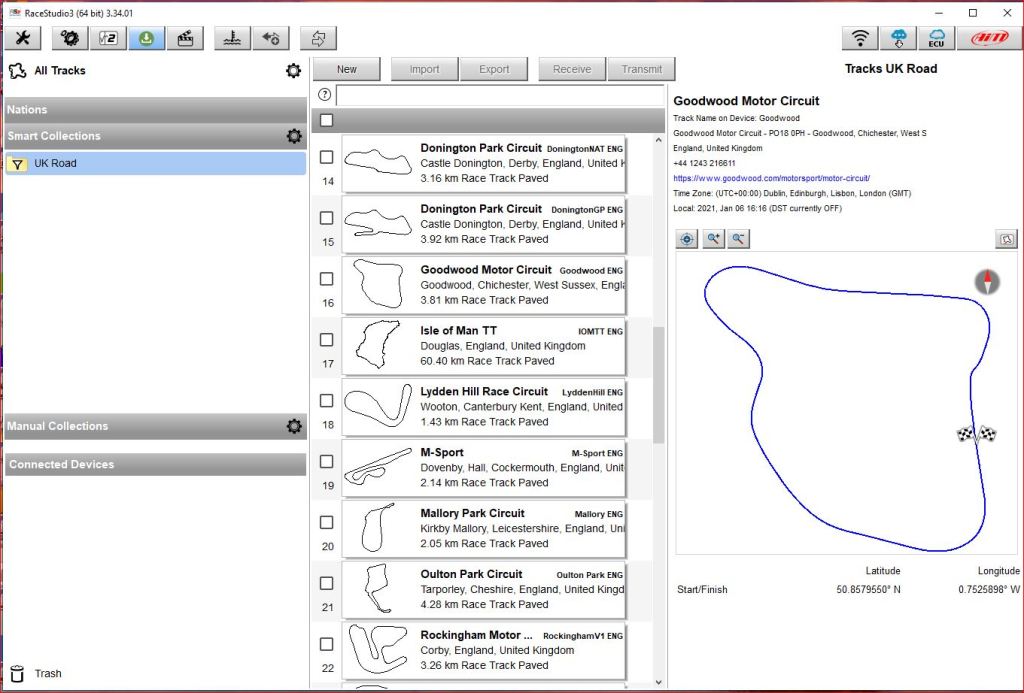
Impressively, the data on over 4000 worldwide tracks are available including some foreign hill climbs; but essentially you need to filter out tracks using various criteria so that tracks you are likely to visit can be saved into collections. A ‘Smart Collection’ allows you to filter, by Continent, Nation, Circuit Type and/or Road Surface and a ‘Manual Collection’ gives you more local control and you may filter to a personal list which can be transmitted to the MX2E. I set up a ‘Smart’ collection of all UK tracks and then filtered into a manual ‘Personal’ collection of those I was likely to visit. It was to this ‘Personal’ collection that I added a small number of custom tracks and hill climbs.
Custom Track: Hill Climb and Sprint
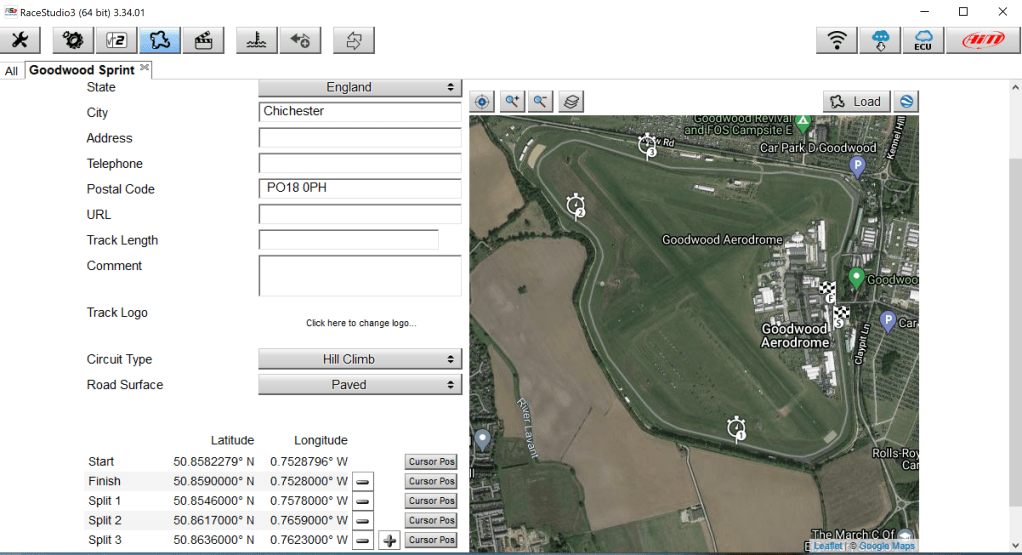
My first chore was to set up a custom track in RS3 which I did for Goodwood as follows. The Goodwood sprint track uses the end of the pit lane as Start point and a Finish point that occurs before the normal track Finish. I therefore set up a new track that I called ‘Goodwood Sprint’ at the circuit, gathering the sprint Start and Finish coordinates whilst standing on the actual lines at the circuit; subsequently, I determined that the best way of setting up a new track is to collect Start and Finish line coordinates and Split points [if required] from Google Maps [satellite view] beforehand. Right Clicking on the required point will reveal the coordinates. You then enter the essential details such as the track name, country etc, and surface and circuit type. It is important that ‘Hill Climb’ is selected as Circuit Type for both sprints and hill climbs so that GPS coordinates gathered as described for Start & Finish lines may be set. All tracks that you have added to the system will contain the word ‘User’ in red letters. A track map should be generated during the live runs which can be exported and loaded into the track configuration at a later time. Any new or edited tracks will need to be added to your filtered collections and downloaded to MX2E. ‘Save’ and ‘Transmit’ to the MX2E after connecting the local network between car and laptop. This process need not be accomplished in one session and you may update as often as required. It is very interesting to note that you can ostensibly set-up a custom hill climb or sprint track and enter all the data even though the software doesn’t recognise that track when you attempt to use it for real. So my setting start and finish points for hill climb and sprint venues were actually a total waste of time…
At the Track – First Goodwood Sprint
On arrival at one of the listed tracks, if you put the car into ‘Track’ mode then MX2E should now recognise the track and its associated coordinates and record the data accordingly during the runs. Sadly, although files were generated for my new custom track maps; at the track the MX2E did not recognise them and therefore did not work as planned.
This is how it panned out at my first visit to Goodwood with the system. When called to the start of a sprint or hill climb you join a queue and shuffle your way forward until the start line is reached. Drivers are sent off at approximately 30 second intervals. Because my AIM video and data logging system was configured for Logger Selection, every time the car moved, the logger and video started recording and over the day resulted in over 40 recordings for just four runs. The video recordings with data overlays of the actual competitive runs were excellent and that alone gave me a lot of useful information but the logger recordings were not so good with 36 spurious files.
Data Analysis
At home I downloaded the data and videos from MX2E on the Lotus to RS3 on my Laptop. A hitch occurred because the RS2 software was supposed to take over for analysis and had not been installed. There is no indication in the user manual that this software is required and on the first occasion of trying it, the ‘gearwheel’ data button obstinately refused to cooperate; it took several emails to AIM tech support before I was told to download and install the RS2 software. https://www.aimtechnologies.com/aim-software/ . The next issue was that not all of the data was displayed – despite being physically present in a file folder. AIM Tech Support were less than helpful in how to resolve this particular issue but I did manage to identify which files were useful and ensure that RS2 displayed them – finally deleting all of the spurious files. It is possible to look at some of the data files in RS2 but the results were a little unsatisfactory.
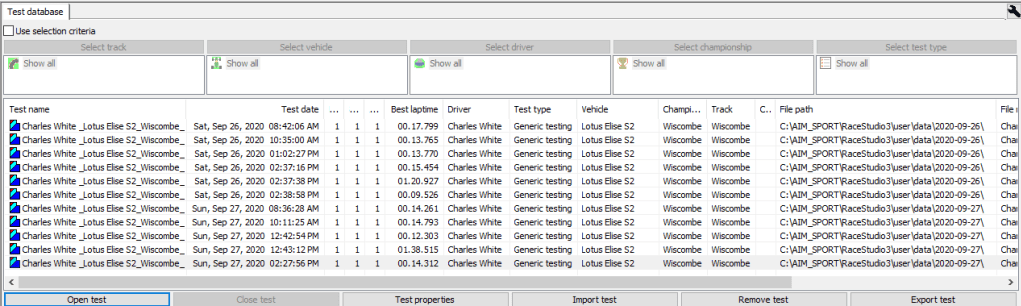
However, I am concerned that no user manual is provided for analysis of the data gathered by MX2E; AIM tech support recommended two YouTube videos made by third parties. I have viewed them and they do seem quite instructional; but still I wonder why AIM appears to produce absolutely no documentation for the RS2 software which seems quite complex… minimalist effort again…
Another small point: when stepping through the list of files in RS3 and RS2 the Up and Down Laptop direction keys do not function which means that navigation is by mouse only – this makes for very awkward navigation.
Video Recordings
The Video recordings may be viewed by clicking ‘Movies’ in RS3. The Video viewing is very basic and you can’t do too much with it other than view the recording, although individual lap times, speed, mph, gear and throttle position data are all superimposed over the video and that is very useful. It would be nice, however, to be able to vary [slow] the speed of the recording so as to look more closely at certain parts of the track. This problem may be resolved in RS3 Beta which allows the video to be part of the main data analysis.
Re Data analysis: Most of my recordings at Goodwood were of a few seconds duration and only two of the four proper runs were recorded which gave me very little data to analyse.
Second Goodwood Sprint
At my second Goodwood sprint, four weeks later, I tried switching on the SmartyCam as I approached the Start line. This didn’t work and I gathered no useful data or even video because the SmartyCam video camera was shutting off before more than half a mile was covered… However, prior to the second meeting I had analysed the video taken at the first Goodwood meeting and adjusted some of my on-track actions which resulted in a two second lap-time improvement which was very encouraging.
Switch into Track Mode before Startline
Subsequent discussions with AIM Support and their Technical Manager led to a recommendation that I remain in Road Mode until approaching the Start Line when I should switch into Track mode shortly before my run. On completing the run I was to switch back to Road mode as soon as possible. This procedure means making seven presses of three buttons in the right order and I made the decision to make the change whilst the driver in front was lined up on the Start line and I was one car back and next to go. As mentioned before, the system is meant to allow a one-button press to switch from Road to Track mode – but this doesn’t work…
Wiscombe Park Hill Climb
The above method was used at the Wiscombe Park hill climb and actually worked out quite well; after stopping in the top holding paddock at the top of the hill after the Finish Line; I reversed the procedure to return the dash to Road mode which stopped the recording.
Curborough Sprint
The Startline procedure for Curborough is slightly different to both Goodwood and Wiscombe in that only one competitor at a time is allowed on track. This leads to a wait of a minute or two on the Startline whilst the previous competitor completes his run. It was after I was called to the Startline and whilst the marshals were lining up my car that I swapped my AIM dash logging system from Road to Track mode; the system is then primed for at least a minute before beginning my run.. I later discovered that the SmartyCam video didn’t trigger until I had travelled at least 50 yards and so the beginning part of the run was not captured. The Data captured wasn’t too useful either. Also, I found that because I was unable to stop immediately after the Finish Line to swap back to Road mode; the system triggered several spurious recordings which it called ‘laps’.
Summary of methods
So far my consensus is that the method used at Wiscombe: i.e. to set the system prior to moving to the Startline gave a better result where it could be used. The majority of Speed events use this method and I will have to devise a better method for tracks such as Curborough. Data gathered is very much hit and miss – but then this must be expected due to the software not being compatible with Speed competitions. However, the recorded video files are much more useful using self-analysis methods.
Interim summary of the Lotus MX2E and SmartyCam system
It is unfortunate that I have been unable to use MX2E for its designed use. I will prepare another report when I have used the car at a track day – which may not be until spring 2021. The dash layout is quite pleasant [other than the criticism of Shift Lights and Indicator locations]. However, there are myriad negative things which add up to an irritating whole.
If you are installing the MX2E alone then your main issue might be the position of the Shift Lights and Indicator Lights. If you have the complete system with SmartyCam you might add the issue of whether it turns off after use. Provision of a lens cover, to protect the SmartyCam lens when not in use, would be a nice touch for AIM to contemplate. The length of the connection cables are overlong which meant that tidily arranging them under the binnacle was ‘tricky’.
Installation of the MX2E is fairly straightforward, although it would be nice to be given a list of tools required – considering the cost of the system, it would be a nice touch if the installation kit could include a 3mm Allen key and a 7 mm socket; this surely would not break the bank.
The system is advertised as ‘Plug and Play’. When first Plugged into my Lotus Elise Series 2 it certainly wasn’t Play because the Speed and RPM displays were not present when the system did not recognise the correct year and model.
Gear display: no reverse or first gear indication [unless moving]. I welcome a gear display and applaud its inclusion. However, AIM should warn users via a note in the user manual on how the display is calculated and that neutral will be displayed until the car is rolling in a forward direction. I wasted several hours trying to fix an issue that is a ‘feature’ of the system.
A DVD is not too useful these days as many laptops are not fitted with them; but if AIM are going to provide one, then the DVD should contain all of the software and manuals required. Otherwise a proper list of required software and user manuals should be provided – you shouldn’t have to ferret around the various AIM websites to look for anything useful.
The MX2E/SmartyCam is supplied as a system and you might expect a SmartyCam installation procedure to be provided – which is not. Ah the documentation… inadequate in the main. Although the MX2E and SmartyCam user manuals covered most of the basics, there was lots of essential information missing from both manuals and some of the information provided is misleading. If the documentation had been more explicit then I would probably not have needed to bother AIM technical support so much… Sadly, it is fairly typical of many software developers [not just AIM] that documentation is often unfit for purpose.
The RS2 software is a highly complex analysis program and the total lack of a user manual almost beggars belief. The available You-tube videos on RS2 are instructional but slightly out-of date and do not cover the subject adequately.
AIM Technical Support
So far as AIM Technical Support is concerned – like the curate’s egg I found it useful in parts… when the Technical Support person was indisposed my advice requests were ignored and it took a strong e-mail to various managers to finally elicit a response.
Conclusion
My conclusion is that for a longstanding company of AIM’s stature, it falls down in many aspects. The MX2E feels as if it was rushed out with little regard to proper testing beforehand. Documentation is poor and the user is left to muddle through with installation and use. If you have a Lotus and wish MX2E to evaluate your own and the car’s performance on hill climbs and sprints then I suggest that you look elsewhere for a solution. I have yet to try the system at a Track day when I will hopefully find the MX2E more useful.
 Grass Roots Motor Sport - UK
Hi Charles I have read your review AIM, very good. Why do you not offer with your journalistic background to edit the instructions and submit your suggestions for a fee of course, I am sure you will do a first class job,
On Fri, 8 Jan 2021, 17:36 Grass Roots Motor Sport – UK, wrote:
> Charles White posted: ” Introduction Ever since I started seriously > driving in trackdays which led to competing in sprints and then hill > climbs, I have yearned for ways to evaluate my performance; one way is to > time the laps that you do. But the rules at trackdays are quite ” >
LikeLiked by 2 people
Thanks for your comments Ken. I have been in contact with AIM managers in both UK and Italy where their Head Office is located and they are well-aware of my views. A report that I submitted on many of the issues raised in my Blog were to be passed to their design department. Rewriting the user manual would be a fun thing to do, but the issues with the MX2E are also hardware related and dealing with an international company of the size and status of AIM would not be straightforward. In addition, writing the part of the manual to include the RS2 and RS3 analysis would involve a tremendous learning curve and close cooperation with the data engineers; the analysis software is also likely to be updated by the RS3 Beta system currently under test which complicates the issue still further. I shall send a link for this Blog to the UK manager and we shall have to see what develops.
LikeLiked by 1 person